Recording transactions is what you do most in MoneyFlow, so the app tries to cut every unnecessary tap: type the amount, type a few words of note, the category is chosen for you, tap add. This page covers the entry screen, the category suggester, the list and the calendar, and categories.
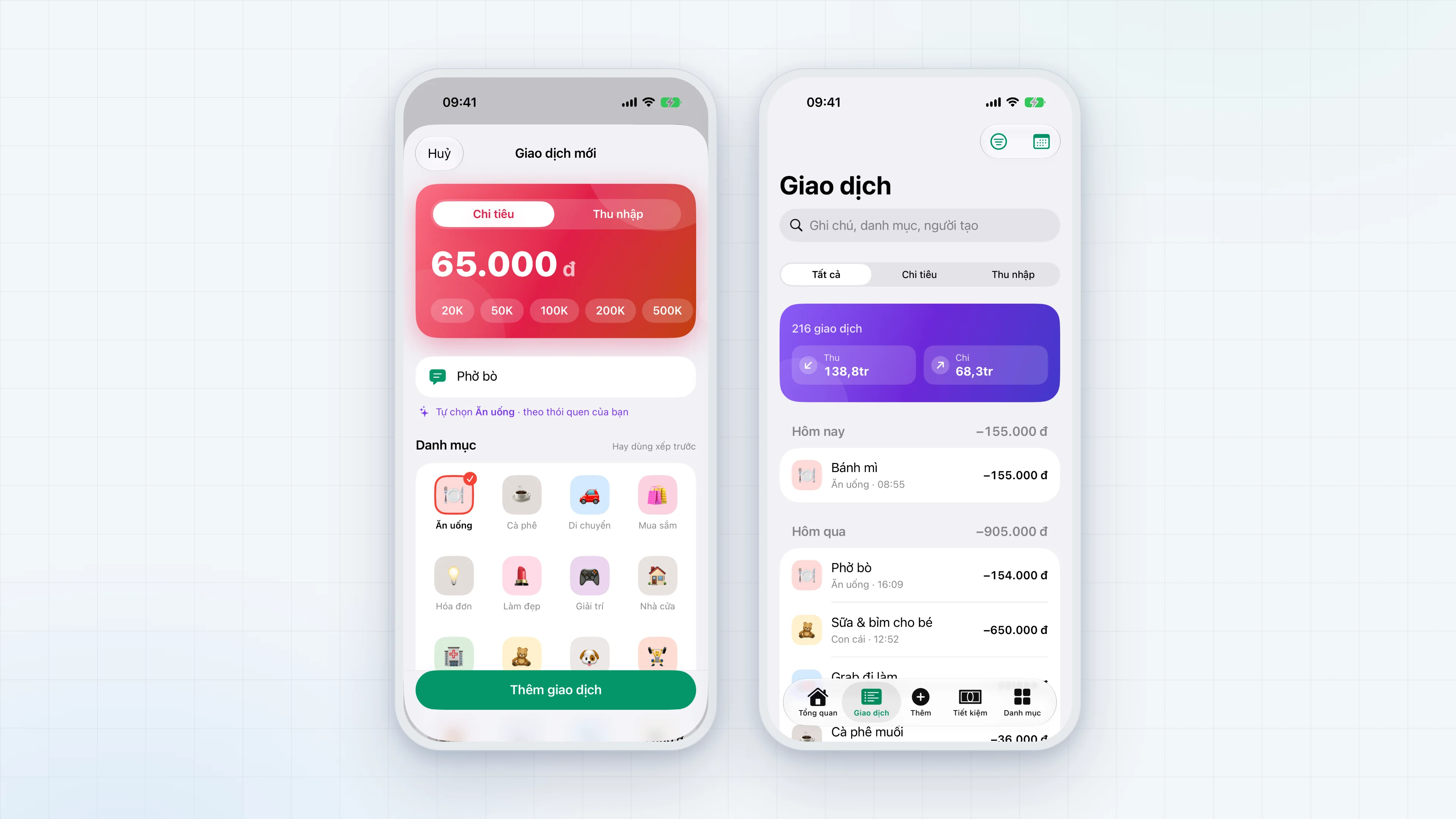
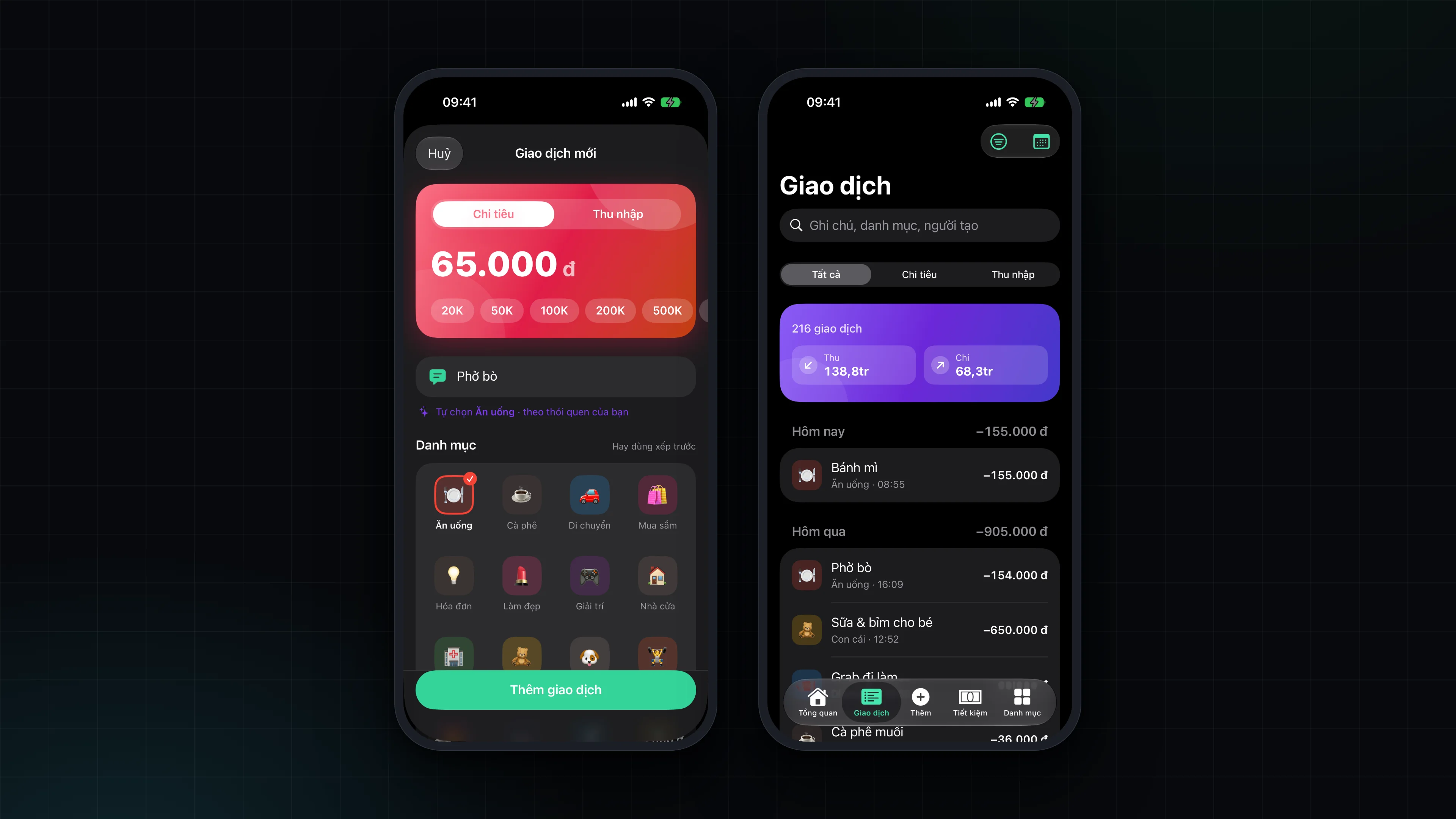
The entry screen
Tap the Add button in the middle of the tab bar to open it. Adding and editing a transaction share one editor.
- Amount card. The amount is shown large on a gradient card: emerald for income, coral for spending. The Chi tiêu / Thu nhập (Spending / Income) switch sits right on the card. The number groups thousands as you type, and a "000" key on the keyboard speeds up round amounts.
- Quick amounts. Six one-tap amounts: 20 thousand, 50 thousand, 100 thousand, 200 thousand, 500 thousand and 1 million. The maximum for a single transaction is 100 billion dong.
- Note. The note field sits right under the amount, because the note is what drives category suggestions.
- Category. A 4-column grid, with the categories used most in the last 90 days first and "Khác" (Other) always last.
- More details. Date and time, who recorded it, a location, tags (separated by commas) and a receipt photo.
When you edit a transaction the app keeps the original author. Switching between income and expense drops a category that no longer fits. The save button is disabled while a receipt photo is still loading.
Smart category suggestion
As you type a note, the app guesses the category from two sources and adds their scores together:
- The household's own history. An exact match of the whole note, then single words and two-word phrases used before, each weighted by how often they appeared. A single word is learned only once it has appeared twice, and very common words ("cho", "tiền", "mua"...) are ignored so they do not pull the wrong category.
- A Vietnamese keyword set. About 250 keywords and phrases for the default categories ("phở", "trà sữa", "grab", "tiền điện", "học phí", "lương"...), matched without regard to accents. A few words that are ambiguous between accented and unaccented forms are handled separately: "bé" is not "be", "cơm" is not "cốm", and "điện" and "nước" count as a bill only when they are the whole note.
Scores add up so a specific phrase such as "trà sữa" beats a single word shared with an old note such as "sữa cho bé". The app picks a category only when the top candidate clearly beats the runner-up; if two are close, it picks nothing.
How the suggestion behaves:
- When you have not chosen a category, the app picks one and says so, for example "Tự chọn Ăn uống, theo thói quen của bạn" (auto-picked Food, from your habits) or "theo ghi chú" (from the note).
- When you have chosen a category yourself, your choice is never overridden. The suggestion then appears only as a chip you can tap to switch.
- The suggester only proposes categories of the same type (income or expense) as the transaction being entered.
The transaction list
The Giao dịch (Transactions) tab shows a list grouped by day, with a total for each day.
- Search by note, category or member.
- Filter by type (all, spending, income) and by time range: all, today, this week, this month, last month, the last 3 months.
- Swipe to edit or delete. Deleting asks for confirmation and cannot be undone.
- Detail. Tap a transaction to see its date and time, author, location, tags and receipt photo.
The transaction calendar
Switch to calendar mode for a whole month. The calendar starts on Monday and each day cell shows the amount spent that day. Tap a day to see that day's transactions.
Receipt photos, locations and tags
A transaction can carry a receipt photo taken with the camera or chosen from the photo library. The photo is stored as a file on the device rather than inside the database, and is deleted when the transaction is deleted. Location and tags are free text; tags show as #tag on the detail screen. The receipt photo stays on the device that took it: sync carries only the file path, not the image file.
Categories
The Danh mục (Categories) tab shows a grid of categories, switches between spending and income, and shows each category's total for the month and the top category.
- 27 default categories: 9 income (Lương, Thưởng, Kinh doanh, Đầu tư, Làm thêm, Cho thuê, Lãi tiết kiệm, Quà tặng, Khác) and 18 spending (Ăn uống, Cà phê, Mua sắm, Làm đẹp, Di chuyển, Độ xe, Nhà cửa, Hóa đơn, Y tế, Học tập, Giải trí, Du lịch, Con cái, Thú cưng, Thể thao, Quà cáp, Đầu tư, Khác). Default categories cannot be edited.
- Custom categories: add with the + button, choosing a name, an icon and a colour. A category that has transactions cannot be deleted.
- Tap a category to see its total for the month, its total over all time and its recent transactions.
Default categories have fixed identifiers derived from name and type, so every device in the household agrees when syncing.