Product Filter (Ajax Product Filter)
The Product Filter module adds a filter to shop/category pages, filtering by Brand, CPU, RAM, Storage, Graphics card, Display, Intended use, Condition and more. It works with AJAX, no page reload, and runs on a dedicated Index table, so it is roughly 10-20× faster than a normal query.
Open Hưng Phát Code → Product Filter.
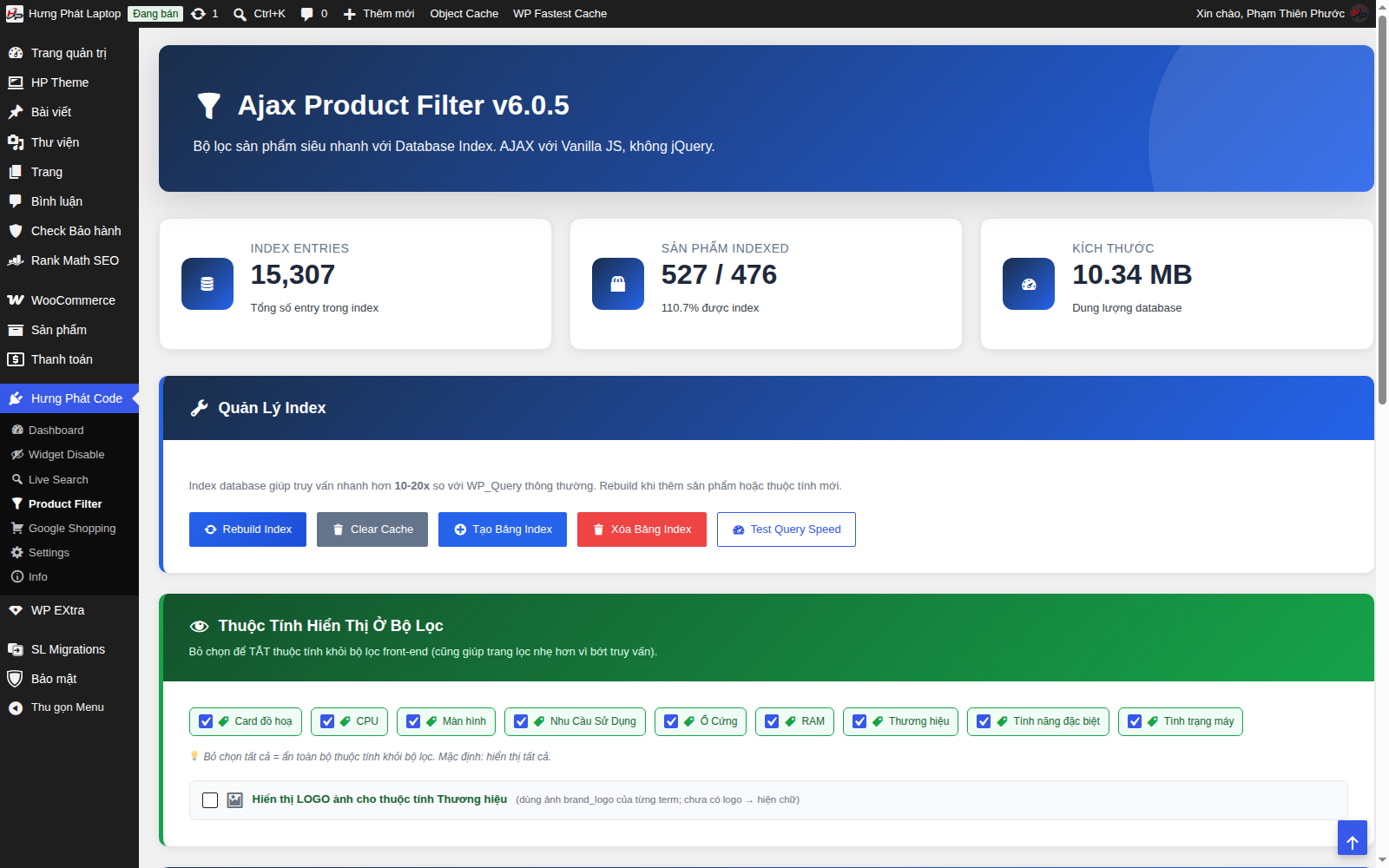
1. The Index table - the heart of the speed
The Quản Lý Index (Index Management) block has these buttons:
- Rebuild Index - rebuilds the whole index. Click it after: adding many products, changing attributes in bulk, or noticing the filter is missing products.
- Tạo Bảng Index / Xóa Bảng Index (Create Index Table / Delete Index Table) - creates or deletes the index table in the database.
- Clear Cache - clears the cached filter results.
- Test Query Speed - measures query speed to check whether the index is effective.
The statistics tiles above show the number of index entries, the number of indexed products and the size.
2. Choose which attributes appear in the filter
In the Thuộc Tính Hiển Thị Ở Bộ Lọc (Attributes Shown in the Filter) block: uncheck an attribute to hide it from the front-end filter (this also makes the page lighter). All attributes are shown by default. Unchecking all of them hides the whole filter block.
3. Brand logos
Turn on Hiển thị LOGO ảnh cho thuộc tính Thương hiệu (Show logo images for the Brand attribute) so the filter shows brand logos instead of text (it uses each term's brand_logo image; terms without a logo show text).
Tips
- Added a new product but the filter doesn't show it yet → click Rebuild Index.
- The filter returns wrong or missing results → Clear Cache, then Rebuild Index.