Background
PixGamma is a macOS app I built for myself, not a job for a client. It takes a small, blurry or heavily compressed photo and gives it back 2 to 16 times larger, with detail restored. Everything runs on the Apple Silicon chip of the Mac itself: no account, no server, no upload.
I built it because I often had to enlarge product photos, screenshots and old pictures, and the tools I could find broke exactly where I needed them most: the letters on keys, on labels, and Vietnamese text with its accents. Version 0.1.0 came out on 18 Oct 2026. By 30 Oct 2026 the source was on its seventh photo model and its third text model. The app used to be called Pixora; I renamed it PixGamma because the old name clashed with several other photo apps.
Who did what: I did the planning, set the image quality goals, chose and trained the models, tested and released the app. Claude wrote the code to that plan and architecture, Gemini (through Antigravity) refined the interface, and Codex reviewed the code and pointed out bugs.

Challenge
Upscaling with AI sounds simple, but three familiar mistakes ruin the result: text is redrawn as other letters, skin, fur and fabric get fake texture, and colours drift. On top of that, many tools ask you to upload your photos to someone else's server.
The hardest part is that "good looking" is not the same as "correct". The well-known model I used as a starting point (UltraSharpV2) gives very sharp pictures, but much of that sharpness is noise and compression blocks from web images, enlarged along with everything else. It looks great until you put it next to the original. I needed a measure that does not depend on how a picture feels. I used DISTS: a score for how different the texture of the enlarged photo is from the original, where lower means closer.
There were three constraints. One person doing the work. Training on my own Mac. And the starting model has its own licence: UltraSharpV2 is for non-commercial use only, so PixGamma is also free and non-commercial, and credits the author of the starting model.
How it was done
1. Build the yardstick before choosing a model
I set up three test sets. The first is 40 compressed web photos never used for training. The second is 25 crops of parrot feathers, hair, eyebrows, lips and skin. The third is generated lines of Vietnamese and English text, shrunk 4 times and then read back line by line by Apple Vision.
The rule from day one: a model only enters the app if it beats the current one on both the test sets and real photos. I scored 10 public 4x models on the 40 photos. Real-ESRGAN x4plus got 0.186, UltraSharpV2 got 0.177, and the best one at the time (4xBHI_dat2_real) got 0.173.
2. Retrain on the Mac itself
Starting from that 0.173 model, I trained it for another 15,000 steps on the Mac's GPU and converted it to Core ML (Apple's format for running AI). I left out GAN, a technique that tends to add fake texture, so the model would not invent detail. That version is PixGamma Photo v1: DISTS 0.165, and pixel accuracy (PSNR) of 30.5 dB against 29.0 dB for the starting model, with almost no colour shift.
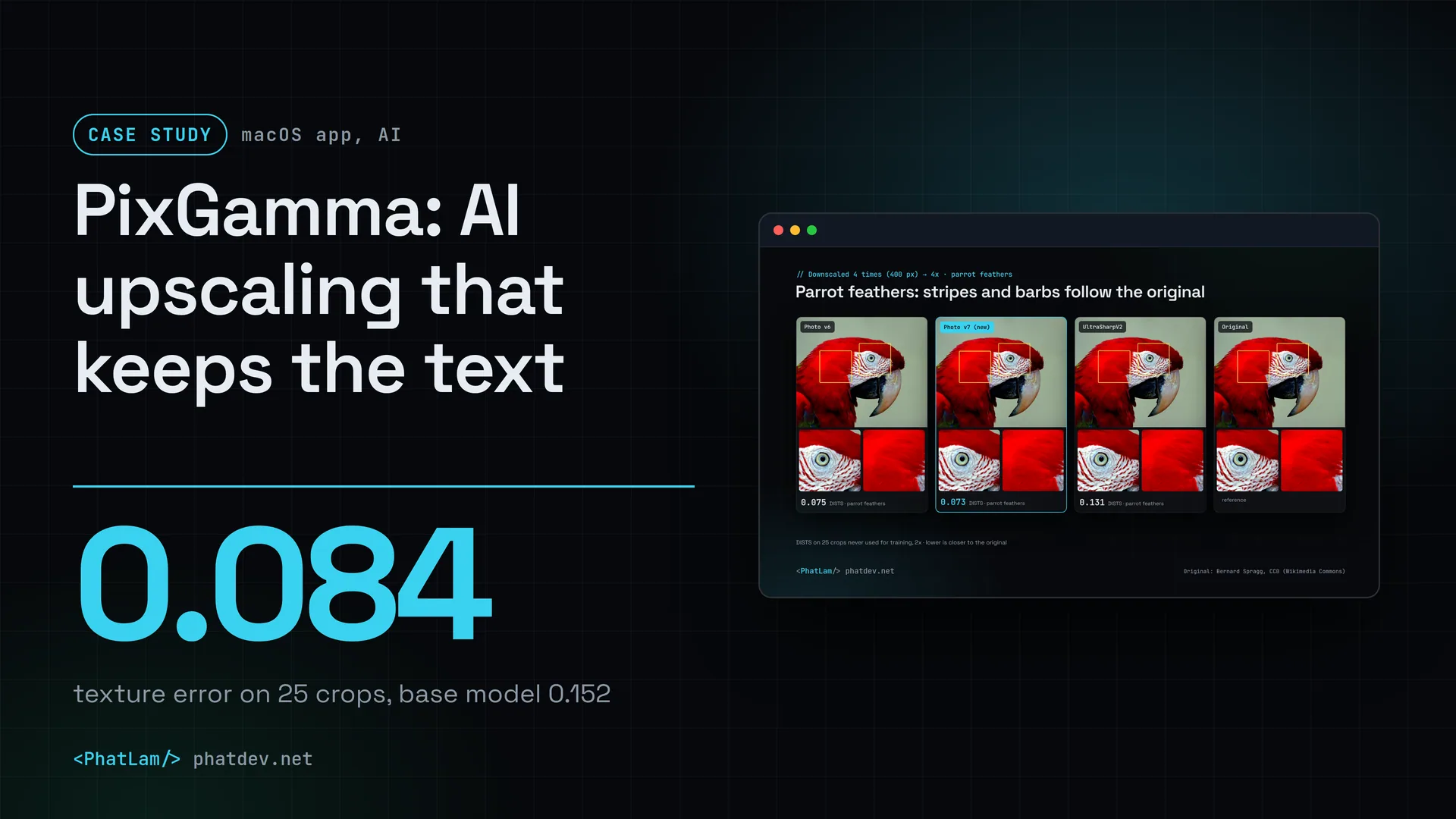
Then I switched to UltraSharpV2 as the base and trained further on close-ups of feathers, hair and skin. On the 25 crops at 2x, the score went from 0.152 for UltraSharpV2 to 0.099 (v3), 0.094 (v4), 0.090 (v6) and 0.084 (v7). The price is slightly lower pixel accuracy: clearer detail means accepting more pixel-level drift.
3. Keep the text with a pipeline of its own
Text is where AI upscalers go wrong most often, so I separate it from the background photo. Apple Vision finds the text, each text area is re-measured from the pixels, rebuilt with a model trained only for text, and blended softly back in. If text is too small or too noisy to rebuild correctly, the app keeps the plain upscale instead of drawing different letters.

The text test set gave me a scare. Shifting the image by just 1 to 3 pixels moved the score for accented letters by up to 6 points, and one test font had no Vietnamese glyphs, so the original showed empty boxes. I switched to averaging over 8 different shifts and replaced that font. After that the numbers could be trusted.
4. What loses gets dropped, and written down
Some versions I expected to win lost. Photo v5, built on 4xNomos2_hq_dat2, lost to v4 on most tests. A text model with thinner strokes (Text v4) looked sharper but read 4.3 px capital letters worse. The idea of reading text with OCR and redrawing it in a font was dropped because it changed the typeface compared with the original.
4xNomos2_hq_dat2 taught a separate lesson: it is the closest to the original on clean 2x photos (0.072) but poor on compressed web photos (0.245, against 0.172 for Photo v7). One good number on one test set is not enough to pick a model.
5. Package it for daily use
The app installs from a DMG file, updates itself from GitHub, checks a SHA-256 hash and can roll back if the new version breaks. There is a pixgamma command that processes whole folders and prints a JSON report, plus an HTTP API that only runs on the Mac for plugging into scripts. The Recover mode uses diffusion to rebuild skin, hair and fur; it is a separate download because it is about 2.7 GB.
The 2x path changed too: it runs the 4x model and shrinks the result by half. On 8 clean photos this gave 35.4 dB and sharpness 0.96 relative to the original, against 34.5 dB and 0.70 for the dedicated 2x model. The cost is about twice the time.
One bug I almost shipped: exporting into the same folder as the original produced a file with the same name and overwrote the original. The latest source adds a -pixgamma suffix on a name clash, in both the app and the command line.
Results
The numbers below come from the project's own test sets, using CC0 and public domain photos from Wikimedia Commons that were never used for training. They are not a user survey. The photo model v7 was measured on 28 Oct 2026, the text model v3 on 30 Oct 2026, and the banner text of version 0.2.1 on 20 Oct 2026.
The grey bar is UltraSharpV2, the public model used as the starting point. The blue bar is PixGamma Photo v7. Measured on 28 Oct 2026 with the project's own test sets: images were shrunk, enlarged back and compared with the original, using CC0 and public domain photos never used for training. DISTS is not the only yardstick: plain bicubic scores 0.140 on the first set because it blurs, so I also measure detail (v7 0.90, UltraSharpV2 1.31, the original is 1.0).
Apple Vision reads each generated text line, set in a few common fonts, after a 4x shrink and the full 4x upscale pipeline. The first row was measured on 20 Oct 2026; the last two on 30 Oct 2026 over 40 lines, averaged over 8 pixel shifts. The two sets are scored differently, so do not compare rows with each other. Limit: this is generated text, not real photographs.
On the feathers, hair and skin set, PixGamma v7 scores 0.084 against 0.152 for its starting model. I also measure "detail" against the original, where 1.0 means equal to the original: v7 gets 0.90 and UltraSharpV2 gets 1.31, meaning it adds grain and compression blocks as well. On compressed web photos enlarged 4x the result is close to a tie: 0.164 against 0.177.
For text, version 0.2.1 read 91.1% of characters correctly on Vietnamese and English banners after a 4x upscale. That is a small step up from 90.3% without text protection, but the strokes are visibly straighter: sharpness went from 0.47 to 0.69 and PSNR from 29.1 to 30.5 dB. The newer Text v3 raises correct reading to 92.4%, and to 78.8% for accented letters alone.

Two things I have not solved. Very small text is still a weak spot: when a capital letter is only about 3.6 px tall in the original, a Vietnamese accent is under one pixel, and text that Apple Vision cannot detect is not protected. And Photo v7 and Text v3 are on GitHub but not yet packaged as an installer: the latest installer is still 0.2.1, from 20 Oct 2026.
Lessons
Pick the yardstick first, the model second. Without test sets, sharpness fools you, and the sharpest model turned out to be the one adding the most noise.
One number is not enough. A lower DISTS on one set of photos does not mean better on another, so every model has to pass both the test sets and real photos.
Test sets have bugs too. When the text score jumped 6 points just because the image moved a few pixels, the first fix was to the measuring, not to the model.
Write down the versions you drop. The "tried but not used" table in the docs stops me from retrying dead ends a few weeks later.
The licence of the starting model decides how you can release. Because UltraSharpV2 is non-commercial only, PixGamma is free and non-commercial, and that is something to know on the day you pick the model, not on release day.
Need something similar?
If you want to run an AI model on your own machine, or on a client's, so the data goes nowhere, or you need someone to measure and choose a model for a specific job such as images, text or speech, send me a few lines. I will build the test set from your own data first, then tell you which model to use and why.