Background
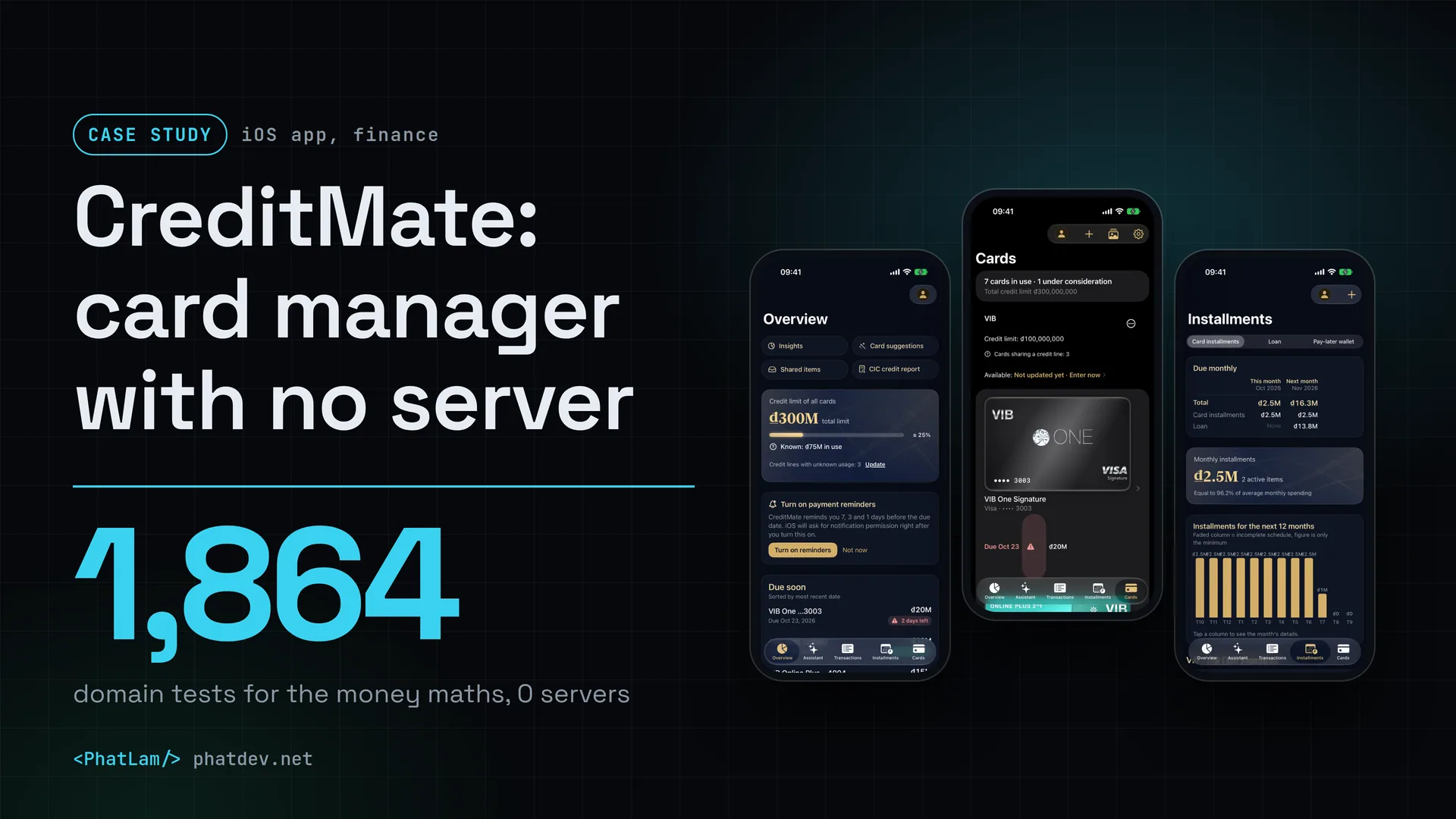
CreditMate is an iPhone and iPad app I built for myself, not a job for a client. It pulls credit cards, consumer loans and pay-later wallets from several banks into one screen and answers four everyday questions: how much do I owe, which payment is due next, how much credit do I really have left, and which card should I use for this purchase.
The app is not on the App Store or TestFlight. Version 0.3.0, dated 8 Oct 2026, is an internal development build, and 0.4.0 is being finished. I tell its story here because the hardest part is not the interface but getting the money maths right.
Who did what: I did the planning, set the direction, designed the architecture and tested. Claude wrote the code to that plan and architecture, Gemini (through Antigravity) refined the interface, and Codex reviewed the code and pointed out bugs.


Challenge
A card holder in Vietnam often keeps several cards at several banks, plus a few instalment plans, a loan and a pay-later wallet. Each bank's app sees only its own cards. Statement dates and due dates differ from bank to bank. Offers change every week. So a simple question like "how much do I have to pay this month in total" is hard to answer.
A spreadsheet can do it, but it goes wrong in the places that matter. The most common one is the shared limit: three cards on one 100 million limit get added up to 300 million. With money, a wrong number looks perfectly fine, so nobody notices.

There are two constraints. Card data is the kind nobody wants on a stranger's server, so my goal was no server of mine at all. And I am one person, so every rule has to be checkable by a machine, not by eye.
How it was done
1. Write the money rules before drawing screens
I wrote the rules down in the project's rule file so that every piece of code has to follow them. Money is a whole number in the smallest unit, with a currency code, never a floating point number. Rates are kept in parts per million, so 6.8% is stored as 68,000. Missing data shows as "unknown" and is never quietly counted as 0. The purchase date, posting date, statement date and due date are four different dates and are never mixed. And a shared limit is stored once on the group, not multiplied by the number of cards.
2. Separate the logic from the interface
All logic lives in a separate package called CreditMateKit, written in plain Swift. The money and ledger parts must not see the interface, the database or the network. The app only handles display and glue. That makes the money calculations testable on their own and repeatable, and I write the tests for them first, using made-up scenarios with fake numbers.

3. Import data without writing blindly
PDF statements, balance-change text messages, screenshots of a banking app and credit reports are all read on the device into drafts. The ledger is written only after I confirm, with a key that stops duplicates when something is imported twice. One-time passwords in messages are only counted, never stored. A PDF's password is used once.
The same rule applies to the AI assistant. It answers from the numbers inside the app and can only create drafts, never write straight into the ledger.
4. Keep it private from day one
The app locks with Face ID or a separate 6-digit CreditMate PIN. A full card number and CVV, if the user chooses to save them, sit in an AES-GCM encrypted vault in the Keychain that only works on this device. Backups are encrypted too. A full card number never reaches the assistant or a backup.
The AI assistant is the only part that can call outside, and only when the user turns it on, with the user's own API key kept in the Keychain. An on-device AI can be chosen instead, and there is a monthly cost budget.
5. Test as if holding real money
The logic package has its own test suite that runs with one command. The interface has tests that run on both iPhone and iPad. There are dedicated tests for the rule on recording what is owed, for preventing double entries when importing again, for totals never turning "unknown" into 0, and for currencies other than VND.
Real bugs still happen, and I log all of them in the changelog. Once, a manually entered transaction on a foreign-currency card was read as VND. PDF statements once had VND hard-coded as the currency. On iPad, the Cards screen once opened the wrong card after switching groups. All three are fixed.
Results
The numbers below are counts from the source code, listed on the project page (updated 23 Oct 2026). They describe testing effort, not results from users, because the app has not been released.
There are 1,864 tests for money, the ledger, instalments and the statement parsers, plus 110 interface tests that run on iPhone and iPad. The offer library covers 27 banks, valid by date, and is clearly marked as unverified. The number of servers is 0: data stays on the device.
That last number sounds like a slogan, so here is what it means: none of my servers hold your data. For the AI assistant alone, if you turn on a cloud AI source, the app calls that provider with your own key.
Some things I have not done. The app is not on the App Store or TestFlight. Figures are entered by the user or read from documents, not taken directly from the bank. The offer data is unverified. And iCloud sync is not switched on, so data currently lives on one device plus an encrypted backup.
Lessons
Write the rules first, draw later. Money is the part that must not be wrong, so it needs written rules before the first screen exists.
"Unknown" is not 0. An empty cell counted as 0 makes the total debt look neat and wrong. Giving it its own state from the start is far cheaper than patching it later.
Draft first, then write to the ledger. When every source of input, AI included, only creates a draft, the user is always the one who presses the final confirm, and a misread statement cannot quietly corrupt the ledger.
Separating logic from the interface is what lets one person keep 1,864 tests under control. The money code knows nothing about screens, so tests run fast and rarely break.
And state the limits. For a finance app, "unverified" and "not released" matter more than one more line of marketing.
Need something similar?
If you need an app where sensitive data stays on the user's device, or software with many calculation rules that must never be wrong, send me a few lines. I will write those rules down with you first, then say what to build and how to test it.