Background
Tan Doanh is a shop that sells computer parts and prebuilt desktops. Its customers rarely buy a single part. They want to put a whole machine together, so they need to know which parts fit each other, whether the power supply is strong enough, and what they would pay each month on installments.
The shop's site, tandoanh.vn, ran on an older, fairly heavy theme and scored low on mobile speed. I rebuilt the interface as a custom theme for WordPress and WooCommerce, then wrote a tool that lets customers assemble a build right on the page. The work started on 30 Jun 2026.
The new theme now runs on tandoanh.vn. The latest measurements in this story are from 8 Nov 2026.

The problem
Three jobs had to be done at once, and they pull in different directions.
The first is speed. The first version of the new theme, measured on 3 Jul 2026, scored only 65 to 77 on mobile depending on the page, with the home page at the low end, 65. The wait for the main image of the first screen ran from 4.4 to 12.4 seconds.
The second is a build tool that is actually good. Pick from 11 kinds of parts, check compatibility, add up the price, work out installments, then buy or print a quote. Every wrong step loses a customer, or worse, sells someone a part that does not fit.
The third is that shop staff must be able to edit text and images in the WordPress editor themselves, instead of calling a developer to change one line.
How it was done
1. Rebuild as a block theme
The new theme is a block theme (every header, footer and section is a block you can edit in WordPress's Site Editor). More than 50 old pages were moved to blocks. The old theme's shortcodes still work so pages not yet moved do not break. Both languages, Vietnamese and English, are rendered on the server.
2. Measure, change one thing, measure again
I measured with PageSpeed Insights and worked in rounds: find the heaviest thing sitting before the page appears, fix it, measure again. The first round found:
- The reCAPTCHA library (spam protection, 378 KB) was loaded on every page. It now loads only on the contact page.
- Banner images came in one size, so phones downloaded a 1920-pixel file of 179 KB. I produced three sizes and let the device choose.
- The main image of the first screen had not been announced to the browser for early loading.
In a later round I tried inlining the CSS needed for the first screen straight into the page. It made things worse: the home page score dropped to 40 and the browser's blocking time rose to 3,730 milliseconds, because the page grew and the browser processed the CSS twice. I dropped that idea.
The deciding move was a plain one: cutting font files from 20 to 8 (3 Jul 2026). The chain of files to fetch before text appears got much shorter, and the home page jumped from 79 to 92 in my own test setup.

3. PC Builder: one table for 11 part groups
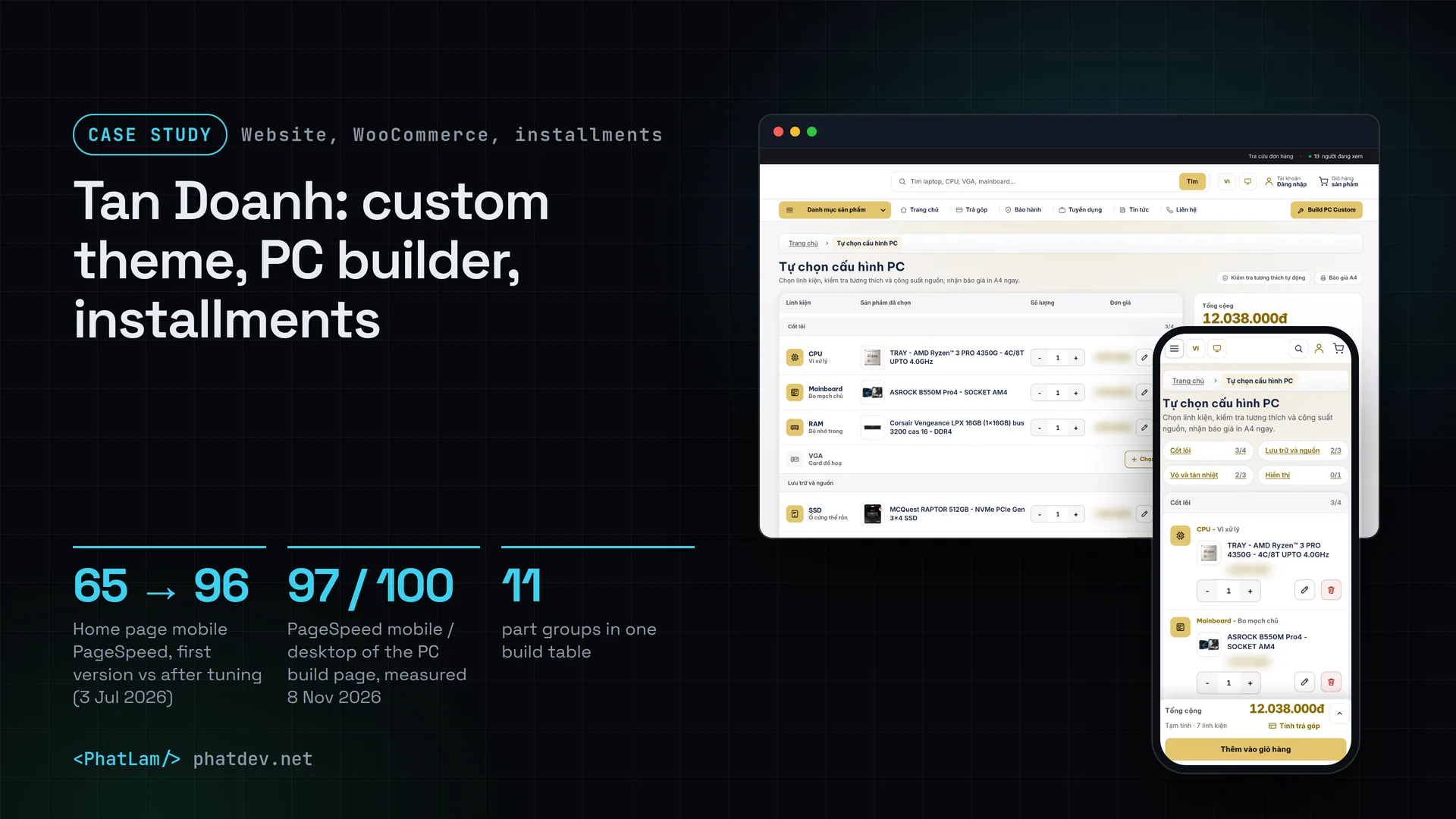
The build tool is a plugin of its own. Each part group (CPU, motherboard, RAM, graphics card, storage, power supply, case, cooler, monitor and so on) is one row in a table. Click a row to open a picker with filters like a category page. The picker lists only items that can be sold, and price and stock come from the live shop.
I was most careful about compatibility. When you pick a CPU and a motherboard, the tool compares the socket and the board's chipset. When you pick RAM, it compares the RAM type the board supports. For the power supply it estimates the power needed (with 25% headroom) and warns if the chosen unit falls short.

I also removed something I had got wrong. On the prebuilt desktop pages, the performance score bars were at first a number multiplied by a factor, not a measurement. On 4 Nov 2026, while reviewing, I replaced them with numbers from a benchmark table that has sources, printed the source under each table, and left the bar empty where no number exists.
4. Installments right on the build
Under the total there is a Calculate installments button. The customer picks a credit card or a finance company, picks a bank, and sees the monthly payment, the conversion fee, the card fee, the total to pay and the difference from paying in full. A quick comparison shows four terms: 3, 6, 9 and 12 months. Fees per bank are entered in the admin area, not hard-coded. It only applies to orders of 3 million dong or more.
The figures are always marked as estimates, because the real amount depends on the finance provider and the term the customer picks.

Results
The numbers here are lab numbers from Google's PageSpeed Insights, simulating a phone on a slow network. They differ from real-user data and move by a few points between runs.
Measured with Google PageSpeed Insights, simulating a phone. Before: the first version of the new theme, 3 Jul 2026 (other pages 65 to 77). After: also 3 Jul 2026, at the end of the 25th tuning round. Re-measured on 8 Nov 2026: home page 93 (the same number three times), PC build page 97, desktop 100 for both.
Counted from the theme's font setup, 3 Jul 2026, tuning round 25. In the same change, the home page score in my local test rig jumped from 79 to 92.
Measured on 3 Jul 2026 while working, not re-measured since. This is uncompressed HTML. The number of elements on the page dropped from 3,576 to 2,663 at the same time.
On 8 Nov 2026 I measured again: the PC build page scored 97 on mobile and 100 on desktop, the home page 93 on mobile and 100 on desktop. Layout shift (CLS) stayed at or near 0.
One thing I have not managed. The mobile home page is 93 today, below the 96 of 3 Jul and below the 95 I set as a goal. I have not found the cause, and I am not drawing conclusions from three runs that gave the same number.


Lessons
Measure several times before you believe. The PageSpeed score of one page can differ by 5 points between two runs, so I look at the middle value, not at a single number.
Inlining CSS sounds like a standard speed trick, but on a heavy page it made things worse. Every trick has to be measured on your own page.
A number without a source goes, even when it makes the page look better. The benchmark bars multiplied by a factor looked convincing, and that is exactly why they had to go.
For customers who buy many parts, the tool should do the hardest part for them: knowing which part fits which. A pretty interface comes after that.
Need something similar?
If your shop sells products that must fit together, or your site is slow on phones, send me a few lines about the page. I will measure first, then tell you plainly what is worth fixing and what is not.