Background
A retail group like Tan Doanh keeps its numbers in many places. Stock in one, orders in another, the cash that carriers collect on delivery in a third, warranty in a fourth, the accounting books in a fifth. Each place counts in its own way. To learn the gross margin, or how much a carrier still owes, someone has to sit down and reconcile by hand.
Worse, one wrongly edited old document is enough to make a figure drift without anyone knowing where from. I started building the Tan Doanh ERP on 9 Sep 2026: a single piece of software for inventory, sales, purchasing, warranty, finance and accounting, serving the Tan Doanh and IGA retail business.
This story is plain about where things stand. The software is for internal use, it is in a trial run, and it is not open to the public. So I can only tell you about its size and how it was built. I have no business results to show, and I will not invent any.

The problem
Three constraints come together.
First, this is accounting. One wrong number is wrong money, and when it is wrong you must be able to trace why. Second, many people in many departments use it, and one department's permissions must not leak into another's. Third, the real data lives in systems that are already running, so the ERP has to read from them without damaging them.
And there is a quiet fourth: the accounting part must not be confident too early. It has to run as a draft next to the accounting software already in use, until the two agree.
How it was done
1. A written entry is never edited, only reversed
Everything else rests on this rule. The stock, cash, receivables and cash-on-delivery (COD) ledgers each have a guard in the database itself: it rejects edit and delete commands on those ledgers. A wrong entry is fixed with a reversing entry linked to the wrong one, then the right one is entered. The whole chain stays in place, so every number can be traced back.

I chose PostgreSQL for this because the database needs things it already has: exclusion constraints, triggers, fuzzy search without accents, and time types with time zones.
2. An order follows one closed path
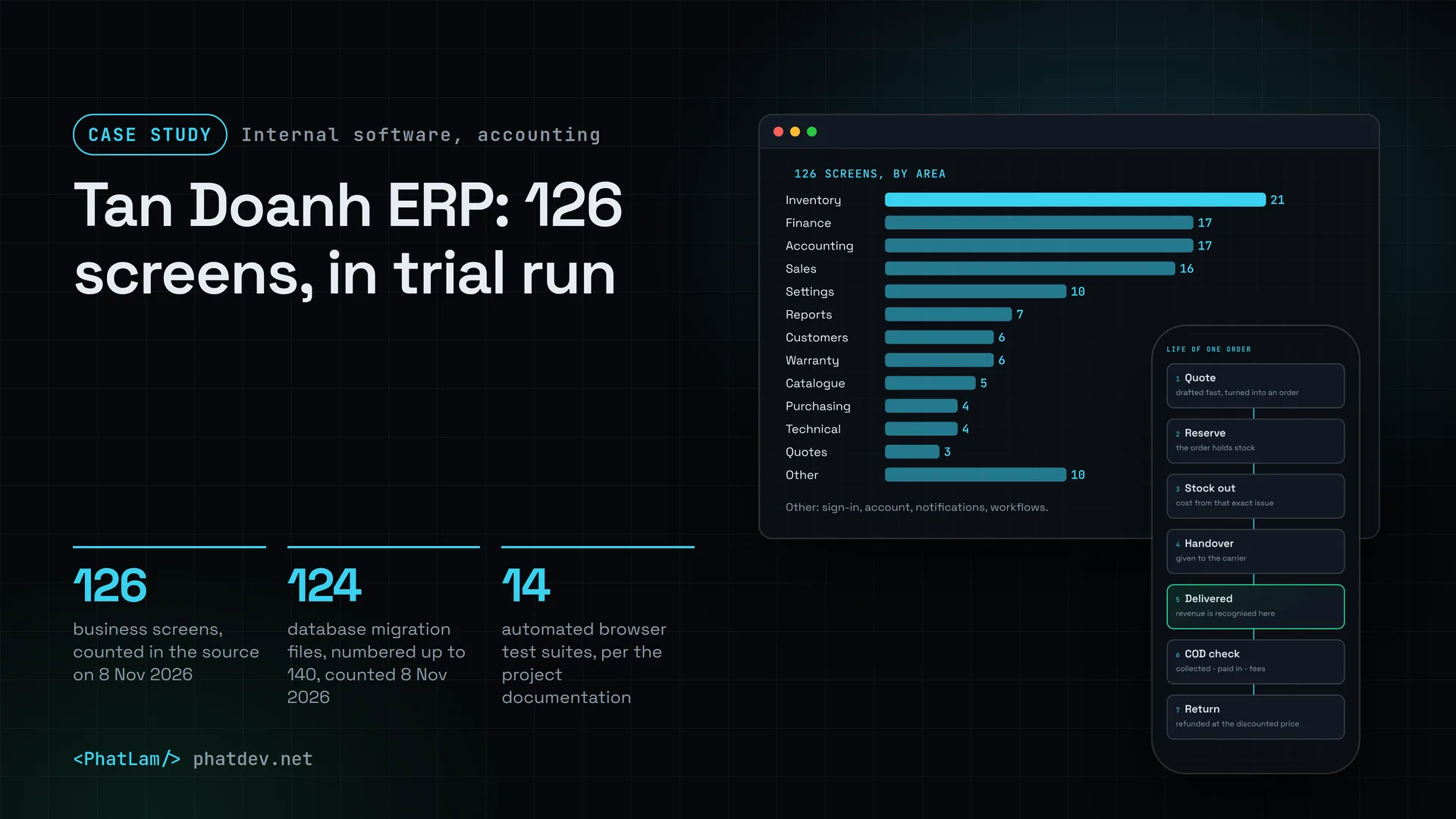
A quote becomes an order, the order reserves stock, stock goes out, the parcel is handed to a carrier, delivery succeeds, COD is reconciled, returns are handled. All of it runs on one engine. A few rules I settled early because they decide the numbers: revenue is recognised on successful delivery, cost is averaged per item and per warehouse, a return is refunded at the discounted price, and COD debt equals collected minus paid in minus approved fees.

3. Permissions by department, not one flat list
If every role goes into one shared list of permissions, one department's rights easily leak into another's. The ERP uses structured permissions: 6 departments, 4 levels, and each permission is tied to a scope (my own, assigned to me, the whole department, everything). The permission check always receives context, and with missing context it refuses. Delegation needs a reason, an approver and an expiry, and cannot be wider than the delegator's own rights. Finance actions separate the person who prepares from the person who approves. These guards sit in the service layer and the database, and do not depend on the interface.
4. Say what is not certain
Business assumptions that are not yet settled all run on a pre-chosen option and are listed in the software's Decision Register. Change the option and the reports change with it, under control, with no code edit. Any field that is guessed or is sample data carries a Demo data label on screen, so it is not mistaken for a real number.
5. Backups must prove themselves
Backups run nightly, encrypted, with 14 copies kept and one more copy off the machine. Every Sunday the system rebuilds the database from a backup by itself, counts the tables, tests the guard that blocks ledger edits, and raises an alarm if anything fails. That drill once caught a function that did not name its schema explicitly, and once raised a false alarm by counting too early. Both are fixed.
Results
This is the size of the system, not a business result. The numbers come from counting directly in the source code on 8 Nov 2026.

The application has 126 business screens, spread over inventory (21), finance (17), accounting (17), sales (16) and several smaller areas. The database is built from 120+ migration files, numbered up to 140. Each new feature comes with its own migration file. According to the project's documentation there are 14 automated browser test suites, run against a copy built from the latest backup and hard-blocked if they point at real data.
From 9 Sep to 6 Oct the project went step by step: on day one the core ledger engine and 18 business test cases passing (9 Sep), more than 5,000 products loaded into the catalogue (11 Sep), purchasing (12 Sep), quotes (18 Sep), department permissions applied for real (29 Sep), the accounting ledger running as a draft (6 Oct).

There is one thing I have not managed, and it is the most important one. I do not have business results yet. The accounting part is writing a draft next to the accounting software now in use, and under the current plan it becomes the official ledger on 1 Jan 2027. Until then, any claim about how much time or effort the ERP saves would be a guess.
Lessons
Choose the foundation rule before you write screens. The sentence "write once, reverse never edit" sounds rigid, but it makes everything else easier: checking, tracing, correcting.
Put the guard where it is hardest to get around. A button hidden in the interface can still be called directly. A trigger inside the database cannot.
Let the software say "not sure". The Decision Register and the demo labels tell users which parts are still on trial, instead of trusting every number.
And do not rush to tell results you do not have. A bookkeeping system has to run in parallel long enough to be trusted, and it deserves a write-up once it has passed that stage.
Need something similar?
If your numbers are scattered across places that each count in their own way, or you need internal software where one wrong number is wrong money, send me a few lines about your current process. I will redraw the data flow first, then tell you plainly what to do first.