Background
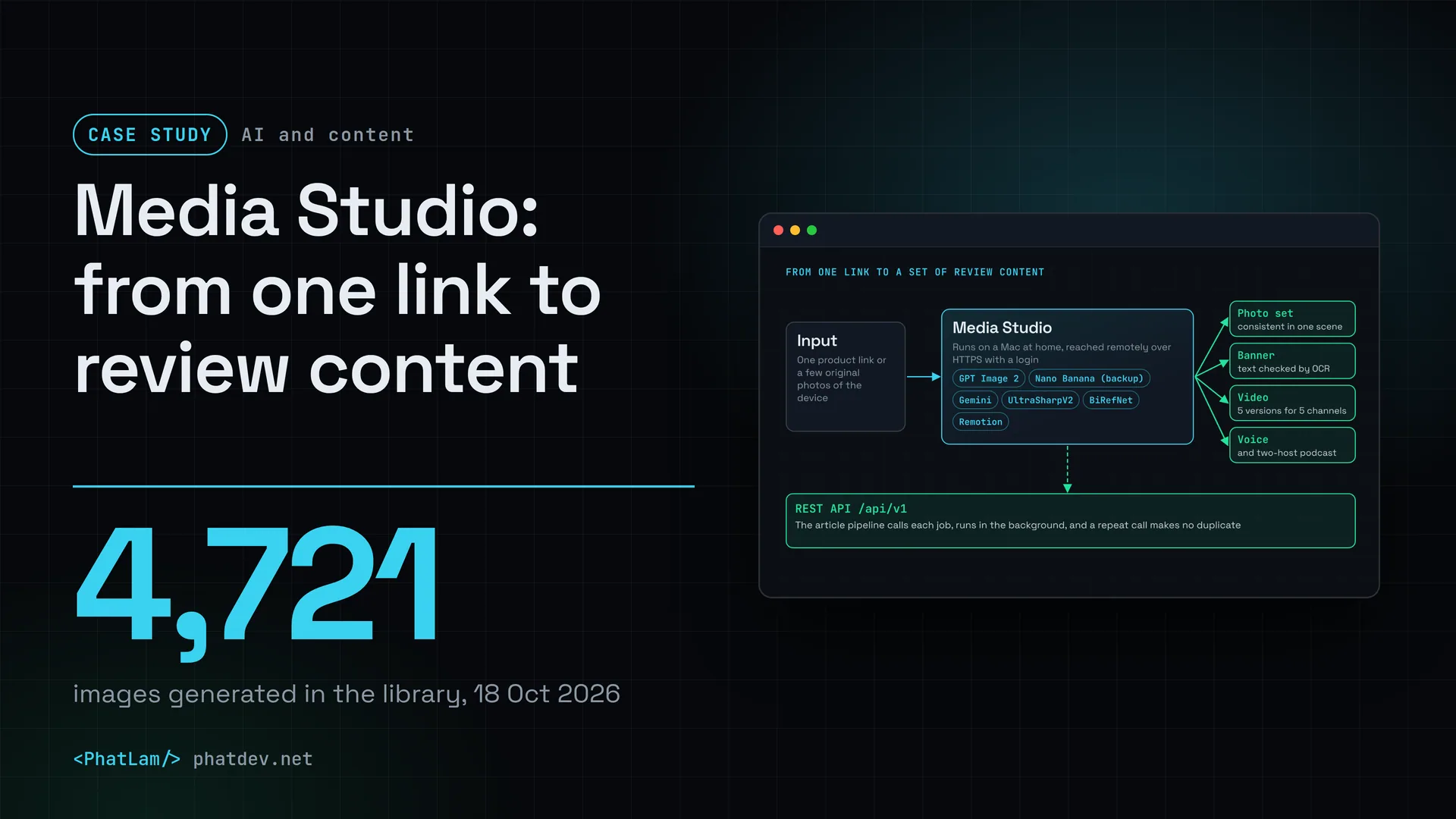
Media Studio is a tool I built to produce review content for tech devices: product photo sets, banners, cover images, benchmark charts, scripts, voice-overs and videos. It is my own project, so no client is named here. It runs on a Mac at home, reached remotely over HTTPS with a login, and every feature can be called through a REST API so that article-writing pipelines fetch their own photos and videos.
The first versions came out around June and July 2026. By 7 Nov 2026 the tool was at version 1.15.50 and still in daily use. Images are drawn by GPT Image 2 through Codex, so no separate API key is needed, and when the quota runs out it switches to Gemini's Nano Banana.
Who did what: I did the planning, set the direction, designed the architecture, ran it and tested it. Claude wrote the code to that plan and architecture, Gemini (through Antigravity) refined the interface, and Codex reviewed the code and pointed out bugs.

Challenge
A device review needs a lot of pieces: a photo set in one style, a cover, a comparison banner, benchmark charts, a script, a voice-over and a video. Each lives in a different tool, so making one article means jumping back and forth.
Three things break most often. The AI redraws the keyboard, the ports and the logo differently from the real device. Vietnamese text on images often loses its accents. And benchmark figures usually have to be looked up by hand, which invites mistakes.
There are three constraints. One person doing the work. Image engines have quotas and fail when they run out. And review content must not invent numbers, so if there is no real figure, the scene has to go.
How it was done
1. Let a machine score the AI photos, then redraw
Instead of trusting my eye on every picture, I compare each AI-drawn photo with the original photo of the device. A second AI (currently Gemini) scores the shape, screen, key letters, ports and logo, and gives a match score from 0 to 100. If it is below the bar of 85, the photo is redrawn, for 2 to 4 rounds, and the highest-scoring version is kept, not the last one drawn.

2. Banners built in layers
I rebuilt banners in layers: the AI draws the background and the headline, while the photo of the device is the original, pasted in afterwards, so it cannot be drawn wrong. The Vietnamese text is read back by OCR. If one accent is wrong, the banner is redrawn or switched to plain HTML text.
3. Every engine has a way out
When the main image engine runs out of quota, the following images go straight to the backup engine until the quota resets, with no wasted failing requests. If both run dry, the app returns a 503 error with a wait time. Text and image-reading jobs (scoring, writing scripts) run on Gemini, so the drawing quota is kept for drawing only.
Other jobs have fallback chains too. Upscaling: UltraSharpV2, then Real-ESRGAN, then Lanczos. Background removal: BiRefNet, then Photoshop, then rembg, then macOS Vision. A cut-out is treated as broken if it loses more than 6% of the device body, has closed holes, or breaks into several pieces, and then the next engine is tried.

4. Real numbers only
Charts and benchmark scenes are built from NotebookCheck CSV files, and 3D render scores come from Blender Open Data (462 GPUs and 1,123 CPUs, CC0 licence). No number means no scene, and nothing is made up. The voice-over is timed word by word with speech recognition running on the machine, so a spec appears right when the narrator mentions it.
5. Turn it into an API for pipelines
Long jobs such as a review photo pack (4 to 5 minutes) or a video render are easily cut off mid-way. So the API has background jobs and a key that stops duplicates: calling again with the same key returns the old result and draws nothing new. The API is locked until at least one key has been created. Since 22 Oct 2026, one product link produces 5 video versions for YouTube, Shorts, Facebook, Reels and TikTok, from one script and one voice reading. An automated suite of 48 checks runs after every change and uses no image-drawing quota.
Results
The numbers below come from the project page, the changelog and the tool's own documentation, with the dates they were recorded. The photo match score is given by an AI, not by a person.
The score is given by an AI comparing against the original photo of the device (shape, screen, key letters, ports, logo). Before: drawn once. After: redrawn for 2 to 4 rounds, keeping the best. The version 1.8 changelog of 26 Aug 2026 records 89 to 92 after the fix; the chart uses the lower value, 89. Limit: scored by a machine, with no human scoring alongside.
After adding a quality check (version 1.13.2, 17 Oct 2026), all 5 images that rembg had punched holes in were replaced with clean versions from another engine. A cut-out counts as broken if it loses more than 6% of the device body, has closed holes or breaks into pieces. Limit: a small set of 23 test images, and the figure is the result on that set.
Studio photos went from 72 to between 89 and 92 match points once the self-scoring and fixing loop was in (26 Aug 2026). The library held 4,721 images on 18 Oct 2026, in one dashboard with 9 tools and a library. When I switched to UltraSharpV2 for upscaling (16 to 17 Oct 2026), it beat Real-ESRGAN on 10 out of 10 test images, with a PSNR (pixel accuracy) higher by 2.7 to 4.9 dB, and it kept key letters and chart text correct.
Two things I have not done. I have not measured the time or cost saved compared with doing it by hand, so there is no such number. And 4,721 is the number of images generated, not the number used: many are discarded test versions.
Lessons
Let a machine grade before a person looks. An automatic scoring round turns "the AI photo looks fine" into a number you can track, and it is why studio photos reached 89 to 92.
Do not let the AI redraw what must not be wrong. Pasting the original device photo onto an AI-drawn background gives a more faithful result than asking the AI to draw the device too.
Every engine needs a way out. Quotas run dry without warning, so switching engines has to be automatic, not the job of whoever is waiting.
Real numbers or nothing. For review content, a scene without a figure gets dropped, which beats a good-looking scene that is wrong.
Long jobs must run in the background and a repeat call must not create a duplicate. These two small details decide whether an automated pipeline runs smoothly.
Need something similar?
If you produce many images, banners or videos from a repeating template and want to plug that into your own writing workflow, send me a few lines. I will look at your current process first, then say plainly which parts a machine can do and which need a person to approve.