---
title: "AI modes"
url: https://phatdev.net/en/docs/pixgamma/che-do-ai
lang: en
updated: 2026-10-22
alternate:
  vi: https://phatdev.net/docs/pixgamma/che-do-ai
markdown: https://phatdev.net/en/docs/pixgamma/che-do-ai.md
---

# AI modes

Part of the doc set: [PixGamma](https://phatdev.net/en/docs/pixgamma.md)

> Auto, Standard, High Fidelity, Art & CGI, Low Resolution, sizing, adjustments, output and speed.

PixGamma has six modes. **Auto** measures the photo and picks the model and strengths; the others are there to choose by hand.

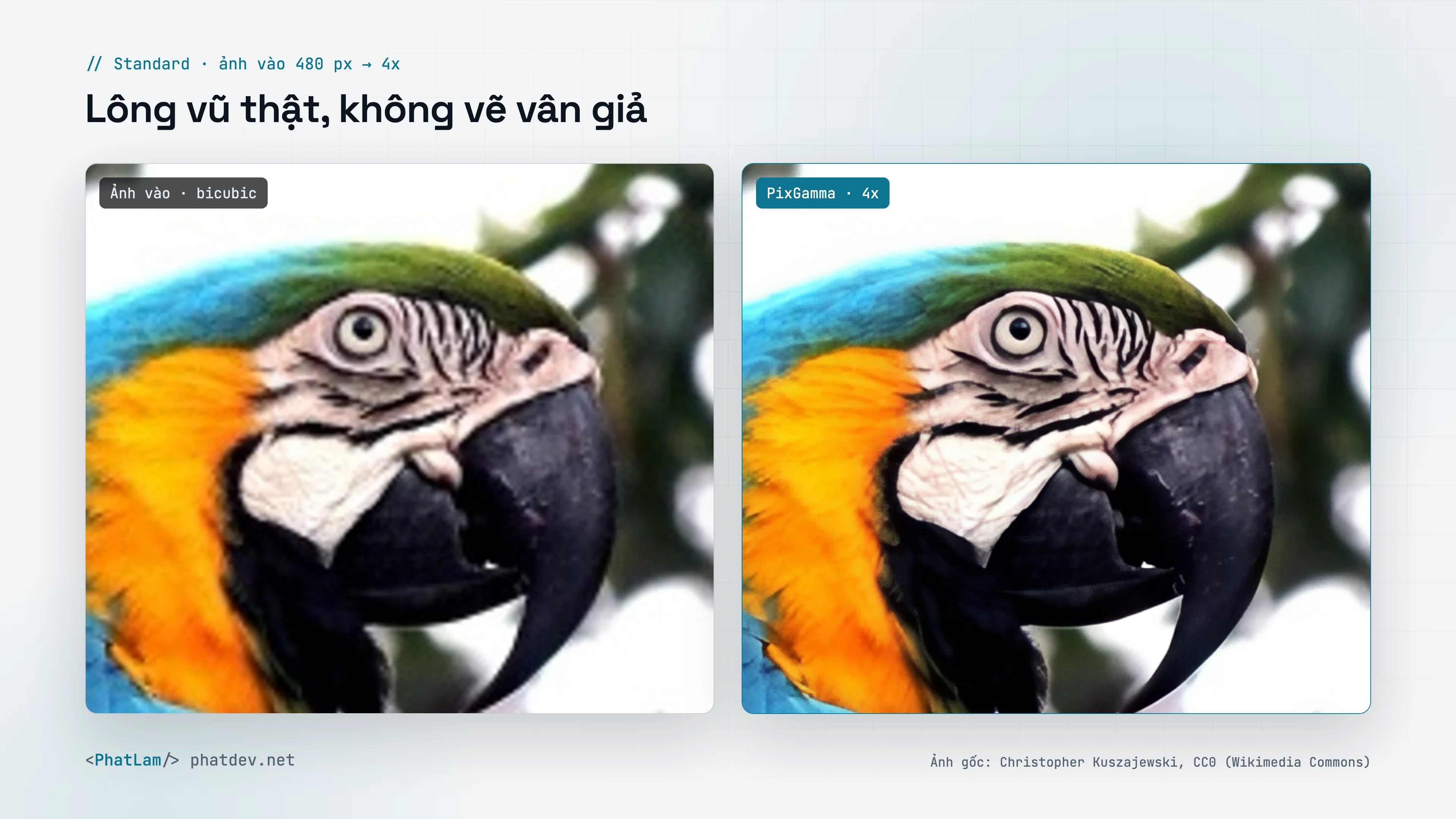
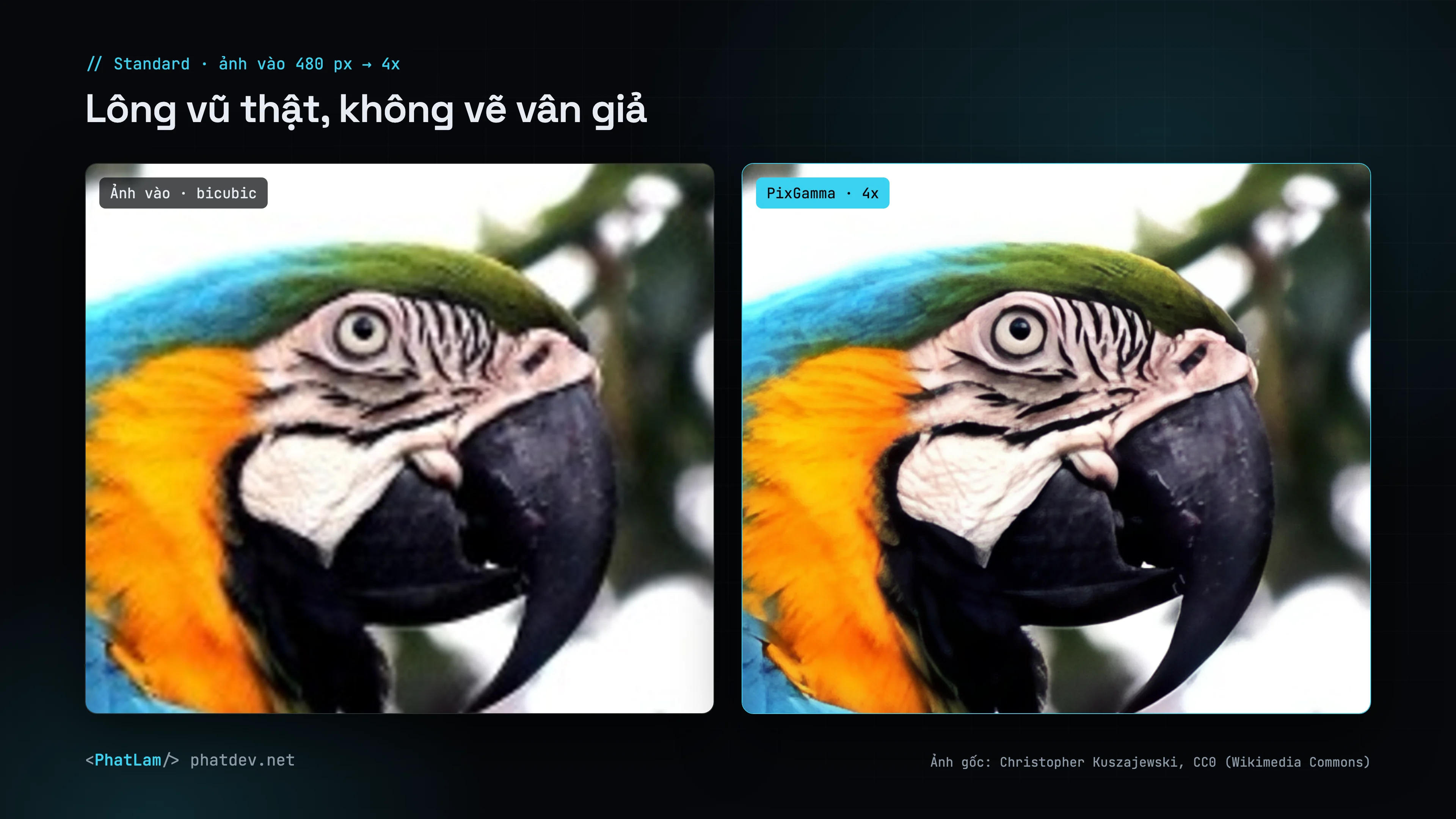
<div style="margin:1.6em 0"><figure style="margin:0"><a href="https://phatdev.net/uploads/p/pixgamma/compare-macaw-vi-light-3840.webp" target="_blank" rel="noopener" class="pd-th-light" style="display:block;border:0" aria-label="Nature: real feathers, no invented texture (4K)"><img src="https://phatdev.net/uploads/p/pixgamma/compare-macaw-vi-light-1920.webp" srcset="/uploads/p/pixgamma/compare-macaw-vi-light-960.webp 960w, /uploads/p/pixgamma/compare-macaw-vi-light-1920.webp 1920w, /uploads/p/pixgamma/compare-macaw-vi-light-3840.webp 3840w" sizes="(max-width: 900px) 100vw, 760px" width="3840" height="2160" alt="Nature: real feathers, no invented texture" loading="lazy" decoding="async" style="width:100%;height:auto;display:block;border:1px solid var(--line);border-radius:12px"></a><a href="https://phatdev.net/uploads/p/pixgamma/compare-macaw-vi-dark-3840.webp" target="_blank" rel="noopener" class="pd-th-dark" style="display:block;border:0" aria-label="Nature: real feathers, no invented texture (4K)"><img src="https://phatdev.net/uploads/p/pixgamma/compare-macaw-vi-dark-1920.webp" srcset="/uploads/p/pixgamma/compare-macaw-vi-dark-960.webp 960w, /uploads/p/pixgamma/compare-macaw-vi-dark-1920.webp 1920w, /uploads/p/pixgamma/compare-macaw-vi-dark-3840.webp 3840w" sizes="(max-width: 900px) 100vw, 760px" width="3840" height="2160" alt="Nature: real feathers, no invented texture" loading="lazy" decoding="async" style="width:100%;height:auto;display:block;border:1px solid var(--line);border-radius:12px"></a><figcaption style="margin-top:8px;font-size:13px;line-height:1.5;color:var(--muted);text-align:center">Nature: real feathers, no invented texture</figcaption></figure></div>

## Modes

| Mode | Model | Use for |
|---|---|---|
| **Auto** | Chosen for you | Default. Measures noise (Immerkær), sharpness (Laplacian variance), JPEG blocking, flat areas and faces, and recognizes artwork |
| **Standard** | PixGamma Photo v2 (4x), SPAN (2x) | Everyday photos: products, landscapes, animals. True materials, no invented texture |
| **High Fidelity** | RealESRNet | Strict faithfulness; the **Detail** slider blends in detail from Standard |
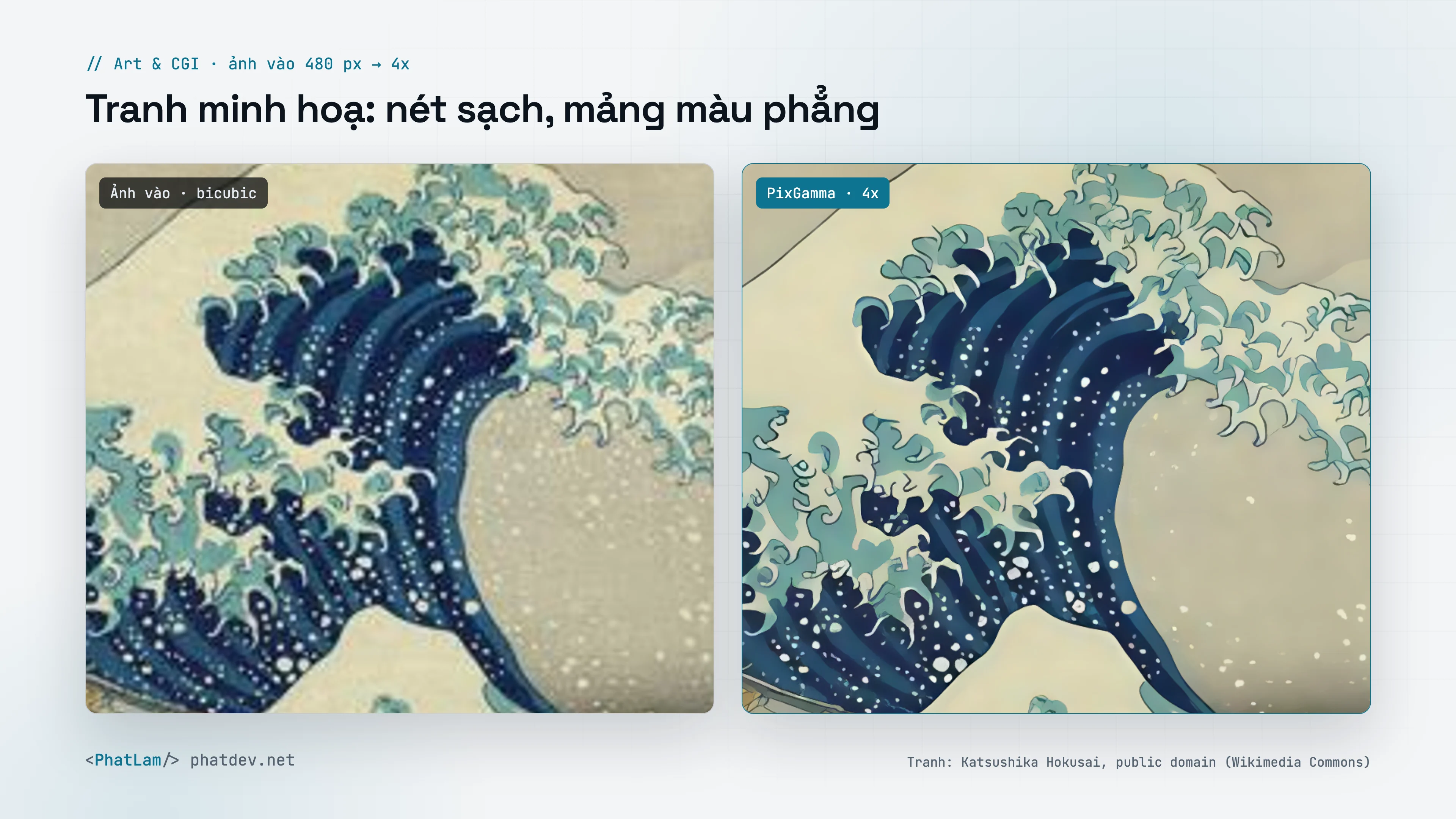
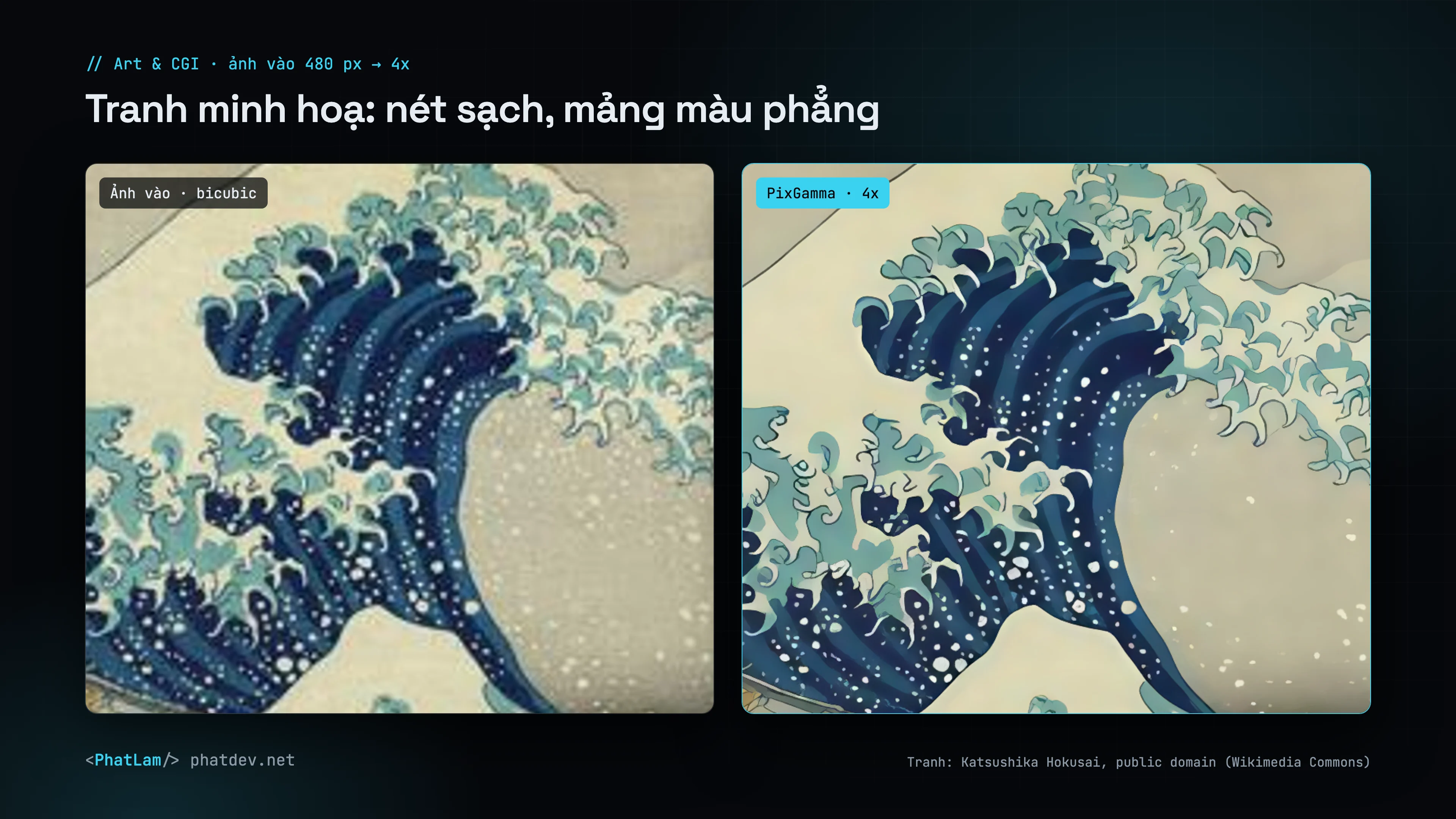
| **Art & CGI** | Real-ESRGAN anime | Paintings, anime, graphics, renders |
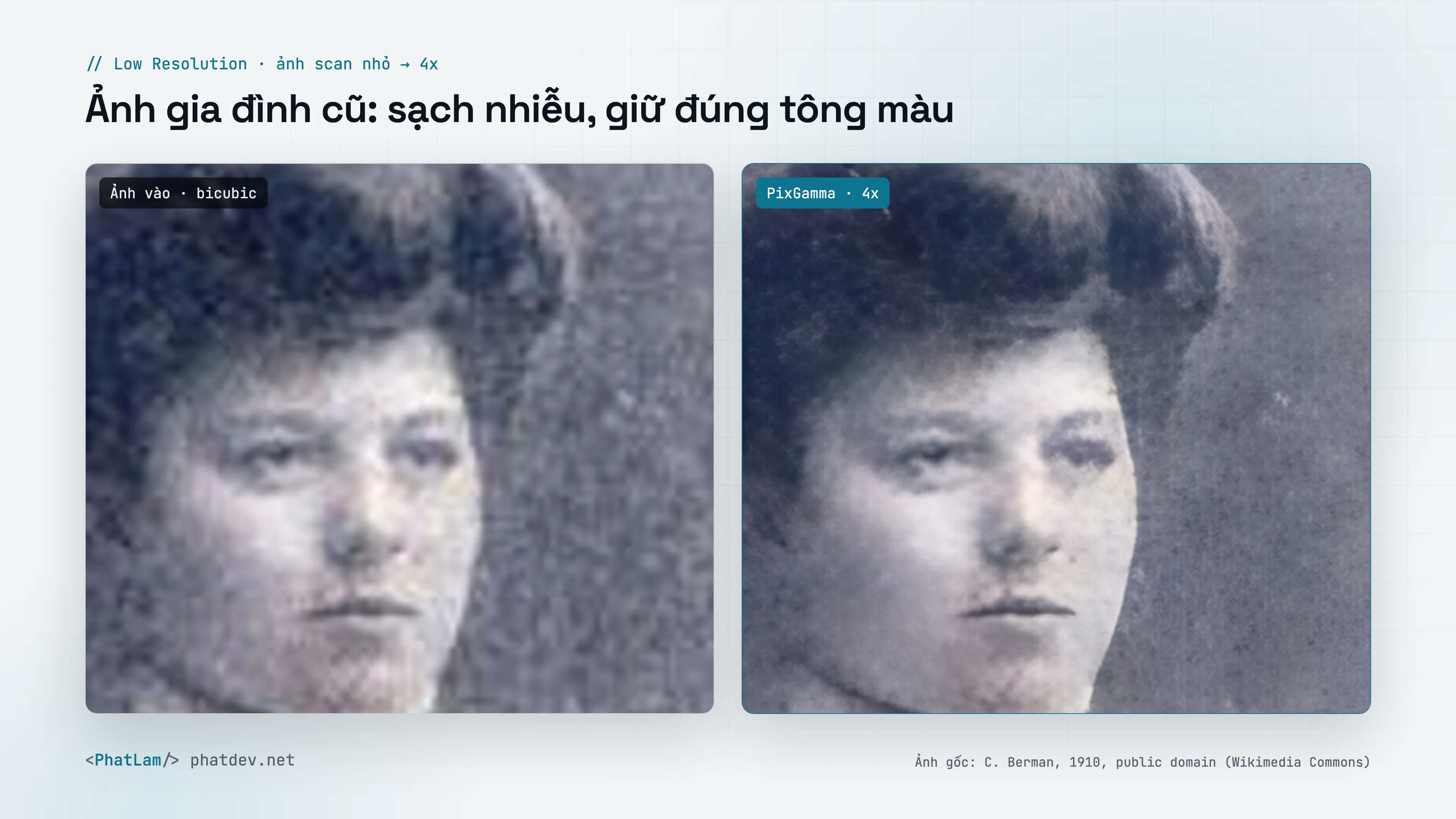
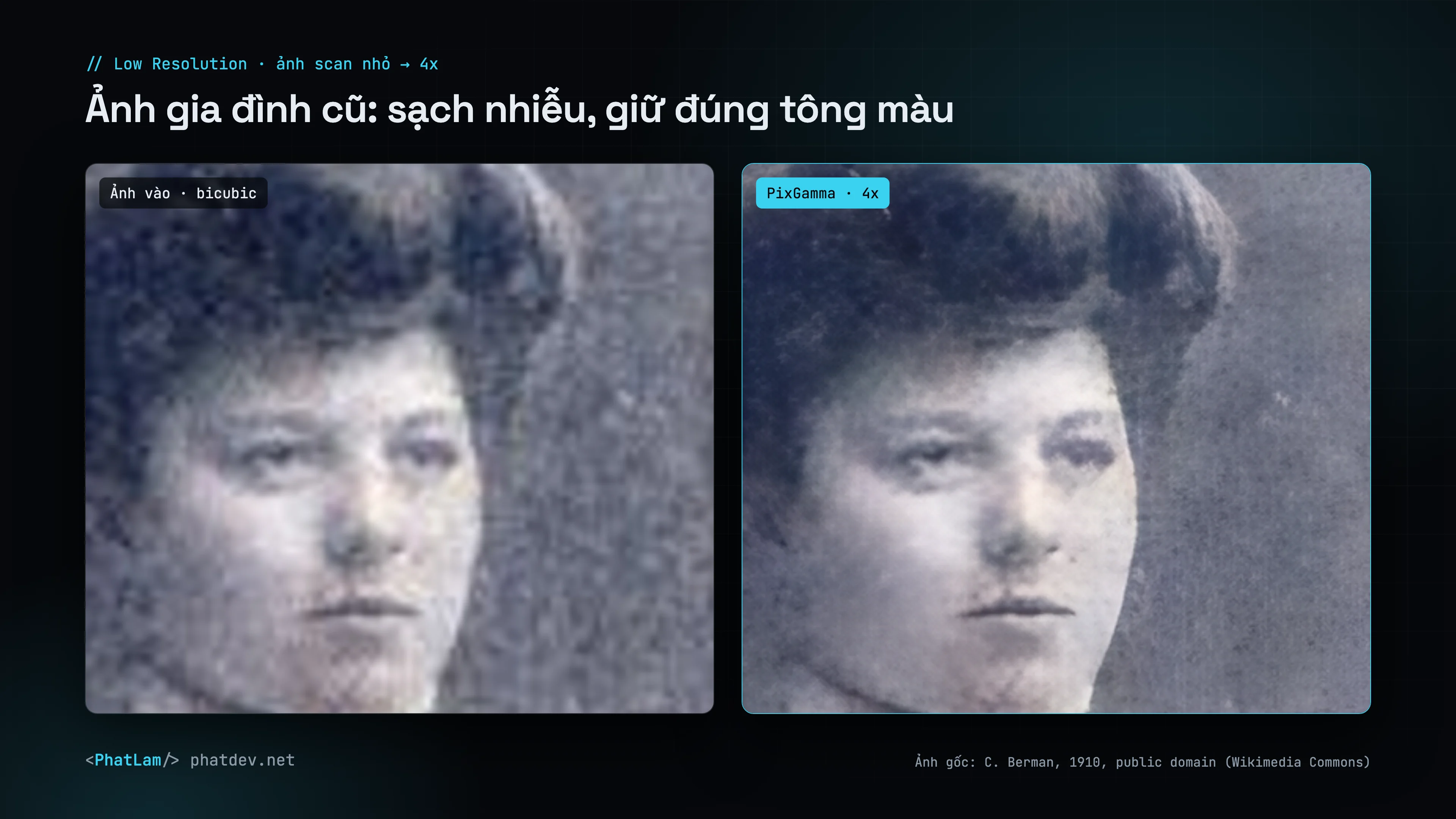
| **Low Resolution** | realesr-general | Very small, noisy images; continuous denoising |
| **Recover** | Diffusion (SD 1.5 + ControlNet Tile) | Badly blurred photos and portraits: redraws skin, hair and fur. See [Recover](https://phatdev.net/en/docs/pixgamma/recover) |

Auto never sharpens on its own and adds no contrast or grain; those sliders are yours to turn on. White-background studio product shots are recognized as photos, not as artwork.

Old, grainy scans do best in **Low Resolution**; paintings and anime in **Art & CGI** when Auto does not pick it.

<div style="margin:1.6em 0"><figure style="margin:0"><a href="https://phatdev.net/uploads/p/pixgamma/compare-oldphoto-vi-light-3840.webp" target="_blank" rel="noopener" class="pd-th-light" style="display:block;border:0" aria-label="Old family photo (1910): Low Resolution cleans the grain and keeps the original tones (4K)"><img src="https://phatdev.net/uploads/p/pixgamma/compare-oldphoto-vi-light-1920.webp" srcset="/uploads/p/pixgamma/compare-oldphoto-vi-light-960.webp 960w, /uploads/p/pixgamma/compare-oldphoto-vi-light-1920.webp 1920w, /uploads/p/pixgamma/compare-oldphoto-vi-light-3840.webp 3840w" sizes="(max-width: 900px) 100vw, 760px" width="3840" height="2160" alt="Old family photo (1910): Low Resolution cleans the grain and keeps the original tones" loading="lazy" decoding="async" style="width:100%;height:auto;display:block;border:1px solid var(--line);border-radius:12px"></a><a href="https://phatdev.net/uploads/p/pixgamma/compare-oldphoto-vi-dark-3840.webp" target="_blank" rel="noopener" class="pd-th-dark" style="display:block;border:0" aria-label="Old family photo (1910): Low Resolution cleans the grain and keeps the original tones (4K)"><img src="https://phatdev.net/uploads/p/pixgamma/compare-oldphoto-vi-dark-1920.webp" srcset="/uploads/p/pixgamma/compare-oldphoto-vi-dark-960.webp 960w, /uploads/p/pixgamma/compare-oldphoto-vi-dark-1920.webp 1920w, /uploads/p/pixgamma/compare-oldphoto-vi-dark-3840.webp 3840w" sizes="(max-width: 900px) 100vw, 760px" width="3840" height="2160" alt="Old family photo (1910): Low Resolution cleans the grain and keeps the original tones" loading="lazy" decoding="async" style="width:100%;height:auto;display:block;border:1px solid var(--line);border-radius:12px"></a><figcaption style="margin-top:8px;font-size:13px;line-height:1.5;color:var(--muted);text-align:center">Old family photo (1910): Low Resolution cleans the grain and keeps the original tones</figcaption></figure></div>

<div style="margin:1.6em 0"><figure style="margin:0"><a href="https://phatdev.net/uploads/p/pixgamma/compare-wave-vi-light-3840.webp" target="_blank" rel="noopener" class="pd-th-light" style="display:block;border:0" aria-label="Illustration: Art & CGI keeps clean lines and flat color (4K)"><img src="https://phatdev.net/uploads/p/pixgamma/compare-wave-vi-light-1920.webp" srcset="/uploads/p/pixgamma/compare-wave-vi-light-960.webp 960w, /uploads/p/pixgamma/compare-wave-vi-light-1920.webp 1920w, /uploads/p/pixgamma/compare-wave-vi-light-3840.webp 3840w" sizes="(max-width: 900px) 100vw, 760px" width="3840" height="2160" alt="Illustration: Art & CGI keeps clean lines and flat color" loading="lazy" decoding="async" style="width:100%;height:auto;display:block;border:1px solid var(--line);border-radius:12px"></a><a href="https://phatdev.net/uploads/p/pixgamma/compare-wave-vi-dark-3840.webp" target="_blank" rel="noopener" class="pd-th-dark" style="display:block;border:0" aria-label="Illustration: Art & CGI keeps clean lines and flat color (4K)"><img src="https://phatdev.net/uploads/p/pixgamma/compare-wave-vi-dark-1920.webp" srcset="/uploads/p/pixgamma/compare-wave-vi-dark-960.webp 960w, /uploads/p/pixgamma/compare-wave-vi-dark-1920.webp 1920w, /uploads/p/pixgamma/compare-wave-vi-dark-3840.webp 3840w" sizes="(max-width: 900px) 100vw, 760px" width="3840" height="2160" alt="Illustration: Art & CGI keeps clean lines and flat color" loading="lazy" decoding="async" style="width:100%;height:auto;display:block;border:1px solid var(--line);border-radius:12px"></a><figcaption style="margin-top:8px;font-size:13px;line-height:1.5;color:var(--muted);text-align:center">Illustration: Art & CGI keeps clean lines and flat color</figcaption></figure></div>

## Size

- By factor **1x–16x**, or by **width** or **height** (aspect kept).
- PixGamma picks the smallest native scale that reaches the target (2x or 4x) and stacks passes above 4x.
- Images are split into 256 px tiles with surrounding context, so no seams show.

## Adjustments

| Slider | Effect |
|---|---|
| Denoise | Removes grain before upscaling |
| Sharpen | Adds crispness after upscaling |
| JPEG cleanup | Removes 8×8 blocks and ringing |
| Dehalo | Clips bright halos around high-contrast edges (default 80) |
| Local contrast | Adds depth and saturation |
| Texture | Adds fine natural grain to areas that are too smooth |
| Faces | **Realistic** (CodeFormer, with an identity slider) or **Creative** (GFPGAN). Black-and-white and sepia photos keep their tone, no blue eyes or pink skin painted in |

After upscaling PixGamma **keeps the original color**: low-frequency color and tone are pulled back to the source, so the model cannot shift the palette. Transparent images keep their alpha channel.

## Output

PNG, JPEG, TIFF, HEIC or the source format. EXIF, GPS and IPTC are kept; DPI can be written; prefix, suffix and model name can be added to file names. **The original is never overwritten.**

## Compute device

GPU by default. `all` (GPU + Neural Engine), `ane` and `cpu` are available. PixGamma Photo runs on the GPU only (the Neural Engine compiler cannot build the DAT2 architecture), and PixGamma switches to the GPU automatically when `ane` or `all` is chosen.

| Image (Mac Studio M2 Ultra) | Time |
|---|---|
| 800 × 600 to 4x, Standard | about 5–8 s |
| 800 × 600 to 2x | about 1 s |
| 3000 × 2000 to 2x | about 3 s |
| Recover, 1536 px output | about 35 s |